
Personalized Catalog Views (PCV): NetSuite ERP for Commerce Customization

Personalized Catalog Views (PCV) is a powerful feature in NetSuite SuiteCommerce and SuiteCommerce Advanced (2019.2 and later) that gives businesses the ability to control item visibility at a granular level.

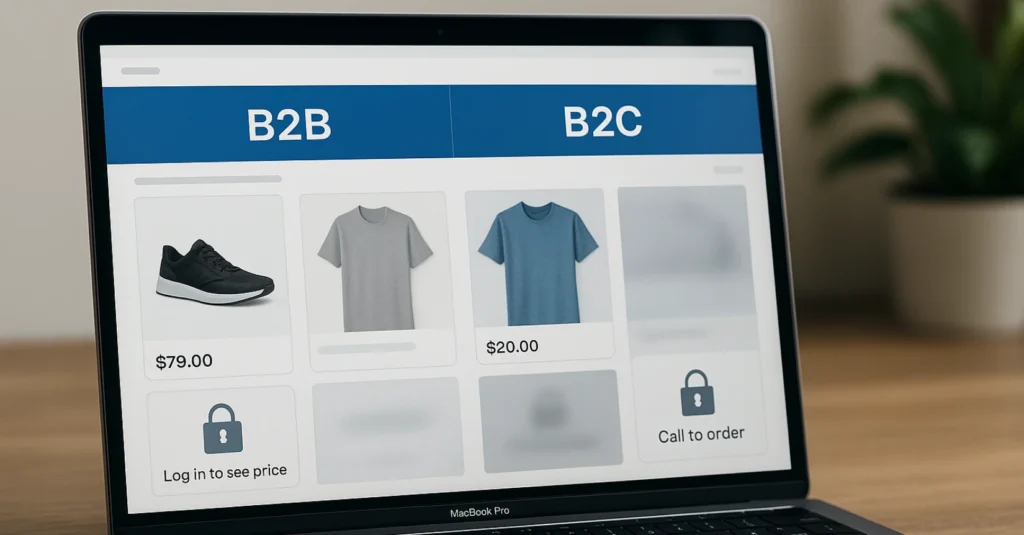
Whether you’re a B2B or B2C brand, PCV empowers you to tailor the shopping experience based on customer segments—driving better engagement and operational efficiency.

Personalized Catalog Views (PCV)

Table of Contents

What is Personalized Catalog Views (PCV)?

PCV allows businesses to group customers and give each group access to different items. You can control what they see, what they can purchase, and whether they can view prices. With this feature, you can:

  • Assign specific items or item collections to defined customer groups.
  • Customize item visibility at four levels:
    • Display Fully (item can be viewed and purchased)
    • Disable Purchase (item and price are visible, but cannot be purchased)
    • Disable Purchase and Hide Price
    • Hide Fully

🔗 View NetSuite Documentation

How to Enable and Set Up PCV in SuiteCommerce

To get started, PCV must be enabled in your NetSuite account:
 
  1. Navigate to Setup > Company > Enable Features
  2. Under Items & Inventory, check Personalized Catalog Views
  3. Save your settings
 
Once enabled, go to:
  • Commerce > Marketing > Personalization > Customer Segments Manager
  • Commerce > Marketing > Personalization > Item Collections
  • Commerce > Marketing > Personalization > Groups

Key Concepts to Understand

Customer Segments

These are groups of customers to configure for a personalized catalog view. You can create:
  • Static Groups: Manually add customers.
  • Dynamic Groups: Automatically add customers using a saved search.
 
Types of customers:
  • Anonymous Users: Not logged in.
  • Recognized Users: Known users (identified but not logged in).
  • Logged-In Users: Customers with active sessions.
  • All Users: Everyone visiting the site.

Item Segments

Group of items visible to one or more customer segments.
Item visibility is controlled through groupings:
 
  1. Item Collections:
    • Static: Manual selection.
    • Dynamic: Based on saved searches.

  2. Commerce Categories: Hierarchical grouping of items.

Item Visibility Levels

Visibility settings dictate how items appear on the website for different user segments:
 
  1. Display Fully – The item can be purchased
  2. Disable Purchase – Price shown, Add to Cart hidden
  3. Disable Purchase and Hide Price
  4. Hide Fully – Completely hidden (useful for unmapped items)

PCV Use Cases and Examples

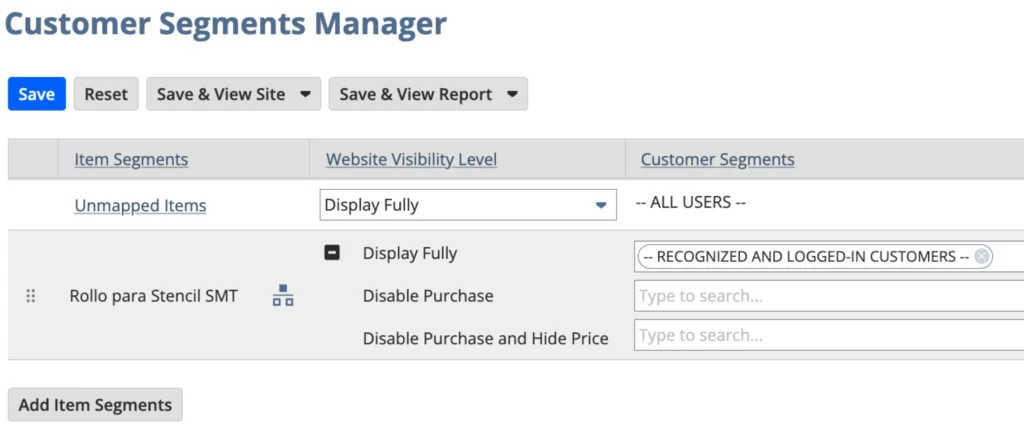
Example 1: Hide Commerce Category from Logged-Out Users

Setup:
  • No custom item collection or customer group needed.
  • Use Customer Segments Manager for mapping.
 
User Experience:
  • Logged Out: Commerce Category is hidden from the menu, items belonging to the commerce category are not visible nor searchable.
  • Note: Check “Exclude Empty Categories” in the Configuration Record so the page is not even visible.
  • Logged In: Commerce Category and its items are fully visible, searchable, and purchasable.
 
Use Case: Restrict certain categories to registered customers only.

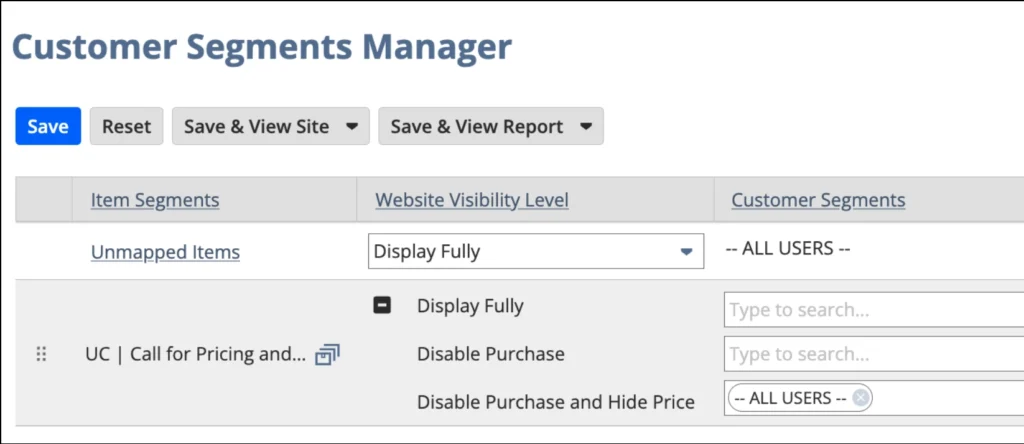
Example 2: Disable Purchase and Hide Price for items flagged with “Call for Pricing” to all customers.

Setup:
  1. Create a saved search for items marked “Call for Pricing.”
  2. Use a dynamic item collection linked to the saved search.
  3. In Customer Segments Manager, assign item collection to the visibility level: “Disable Purchase and Hide Price” for all users.
 
User Experience:
  • Logged Out: “Log in to see price” message is displayed on the item. Add to Cart button is hidden.
  • Note: The web store has a “required login” setting enabled, so that’s why the “Call to order” button shows up.
  • Logged In: The Add to Cart button is hidden, and a message saying “Price not available. Contact us for pricing” is shown instead.
Disable Purchase and Hide Price for items

Use Case: This client implemented a “Call to Order” button which links to the Contact Us page. It enforces sales rep interaction for high-touch or customizable products. This is not native.

Example 3: Separate Catalogs for B2B and Non-B2B Customers

1. Item Saved Search and Dynamic Item Collection: Needed to identify the generic items.
2. Customer Saved Search: Created saved searches to identify “non-B2B” customers and leads.
3. Dynamic Customer Groups: Created customer groups of the same name for the non-B2B customers and leads.
4. Static Item Collections: Created several static item collections to manually specify the specific items for each B2B Customer.
5. Static Customer Group: Created static customer groups to associate with appropriate item collection.
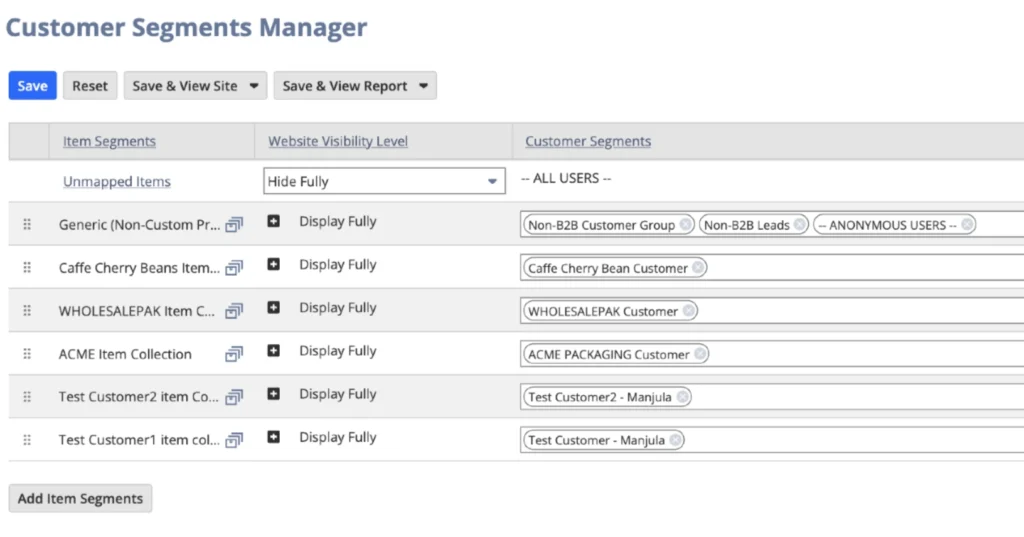
6. Customer Segments Manager: Map item collection to the website visibility level of “Display Fully” to respective customer group.
User Experience:
  • Logged Out / Non-B2B Logged In: See only generic items. To purchase, user needs to log in or create an account.
  • Note/issue: If a logged-out user decides to create an account, they won’t see the generic items immediately after logging in. While this behavior is expected in SuiteCommerce—due to the dynamic nature of the Non-B2B customer group—it can be problematic. The results are updated every hour.
  • Logged In (B2B): Only see items assigned to their item collection.
Customer Segments Manager - Hide fully

Use Case: Deliver a unique, controlled catalog per B2B client or reseller.

Example 4: Limit category visibility based on the “Web Store Brands” field on the customer record

The “Web Store Brands” field on the customer record determines which categories a customer can view and purchase from.

How PCV Can Transform Your SuiteCommerce Store

Personalized Catalog Views (PCV) offer a simple yet powerful way to customize your SuiteCommerce store, making the shopping experience more relevant for each customer. Whether you’re controlling item visibility for B2B clients or hiding prices for specific products, PCV helps you create a smoother, more personalized experience. If you’re ready to see how it can work for your business, feel free to reach out — we’d be happy to help!

Key Takeaways

  • PCV empowers SuiteCommerce users to personalize product visibility by customer type or status.
  • Supports both marketing and operational goals like channel control, gated pricing, and product segmentation.
  • Combines customer segments with item collections for flexible catalog rules.
  • Works well for advanced use cases like B2B contract-specific catalogs, price masking, and regional item visibility.

Share this post

You may also like