

Joaquin Varela

SuiteCommerce CPQ: How to Quote Complex B2B Orders Without the Email-and-Re-Key Workaround

If your B2B customers configure complex products, chances are someone on your team still copies a quote out of an email and keys it into NetSuite by hand. A native CPQ (configure, price, quote) approach inside SuiteCommerce removes that step entirely: the configuration, the pricing rules, and the order all live in one system, so a quote becomes an order without anyone re-typing it.

Key points:

  • Bolt-on configurators that live in an iframe rarely talk to the cart or to NetSuite.
  • That gap means quotes get emailed, then manually punched in, then emailed back. Every step is a chance to introduce a pricing error or lose a deal to slow turnaround.
  • A CPQ approach built on SuiteCommerce keeps configuration rules, discounting, and inventory checks tied directly to NetSuite as the source of truth.
  • If a NetSuite renewal or licensing decision is coming up, it is the right moment to plan CPQ and discounting scope together, not as an afterthought.

Table of Contents

Why the iframe workaround costs more than it looks like it does

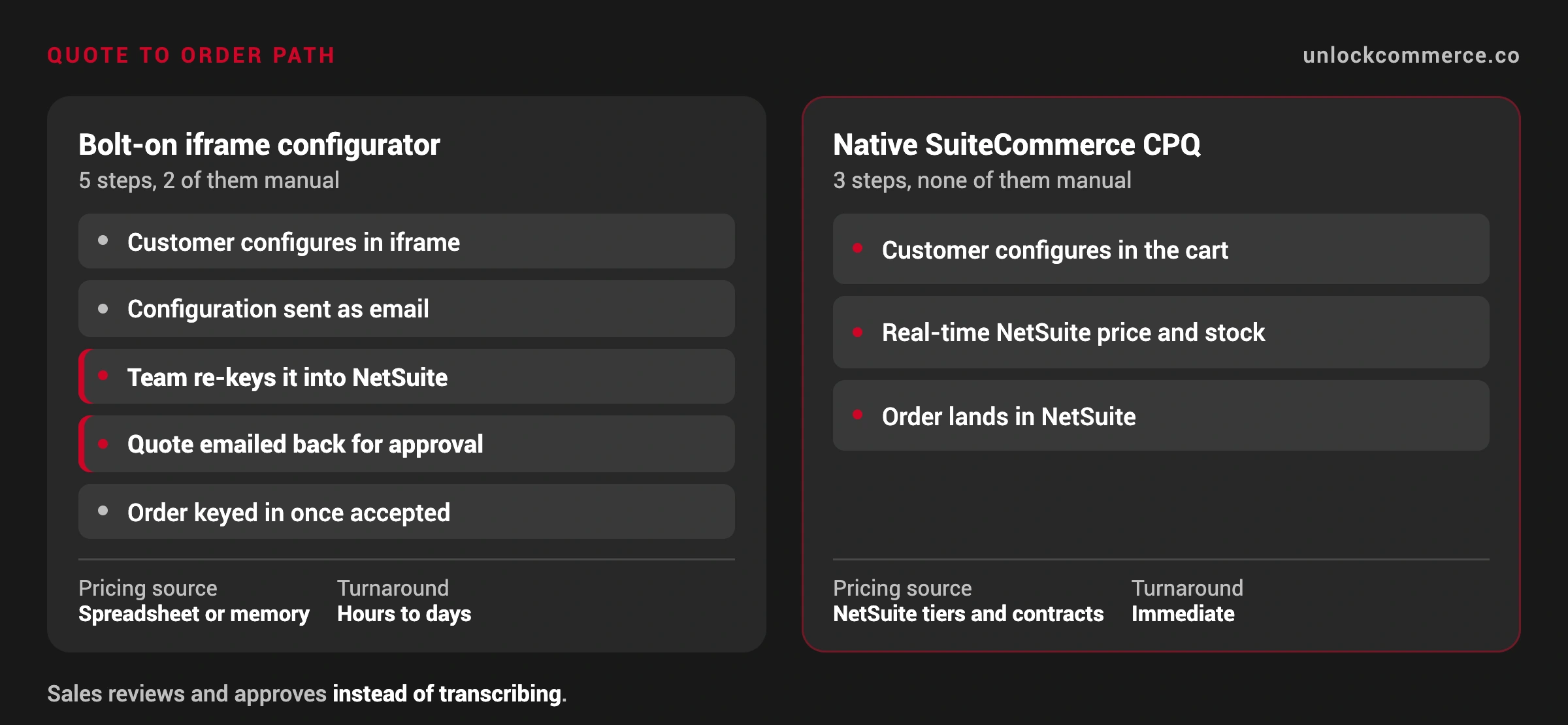
The typical setup: a merchant licenses a third-party configurator, drops it into an iframe on the product page, and calls it done. It looks fine on the surface. The problem shows up downstream. The configurator has no connection to the cart or to NetSuite, so when a customer finishes configuring a product, the result is an email, not an order. Someone on the team reads that email, manually keys the configuration and pricing into NetSuite, and sends a quote back. Every manual step adds turnaround time and a chance for a pricing or discounting mistake, and it puts a ceiling on how many complex quotes your team can process in a day.

This shows up often with distributors selling configurable equipment and parts, and it rarely traces back to a bad decision. It is a sequencing one: the configurator was chosen to solve a front-end problem without asking whether it needed to talk to the ERP.

What a native CPQ approach on SuiteCommerce actually replaces

Instead of an iframe that dead-ends into an email, a CPQ-style build inside SuiteCommerce keeps the configuration logic, the pricing and discounting rules, and the inventory check in the same system that runs your ERP. A customer configures a product, sees a real-time price based on their NetSuite pricing tier or contract terms, and submits an order (or a formal quote) that lands in NetSuite as a transaction, not an email attachment. Your sales team reviews and approves rather than transcribes.

This matters most for distributors and manufacturers where configuration options, tiered pricing, and account-specific discounts already live in NetSuite. The CPQ layer does not replace that data, it exposes it to the customer directly.

Comparison: iframe configurator vs. native SuiteCommerce CPQ

Iframe / email workaroundNative SuiteCommerce CPQ
Where pricing rules liveSplit between the configurator and NetSuiteSingle source of truth in NetSuite
How a quote becomes an orderManually re-keyed by staffSubmitted directly as a NetSuite transaction
Error riskHigh (manual transcription)Low (system-enforced pricing and rules)
Speed to quoteHours to days, depending on staff availabilityNear real-time
Scales with product complexityGets harder to manage as SKUs growBuilt to scale with configuration rules in NetSuite

Where to start if you are running this workaround today

Two questions decide the scope: how many discrete configuration variables does the product actually have, and how much of your discounting logic is already codified in NetSuite versus living in someone’s head or a spreadsheet? The first tells you the complexity of the configurator UI. The second tells you how much of the CPQ project is commerce work versus ERP cleanup.

If a NetSuite renewal or version upgrade is on the calendar, that is the natural checkpoint to scope CPQ and discounting together rather than bolting on another disconnected tool. It’s also worth planning who maintains the configuration rules after launch; ongoing SuiteCommerce managed services typically cover that upkeep so pricing logic does not drift out of sync with NetSuite over time.

FAQ

It can, or it can sit alongside it, depending on how much of your configuration logic is already built. The goal is connecting configuration to real-time NetSuite pricing and inventory, not necessarily rebuilding the UI from scratch.

CPQ-style configuration is typically built as a SuiteCommerce extension. Standard SuiteCommerce should be enough to build this.

It depends entirely on how many configuration variables and pricing rules are involved. A narrow use case (a handful of configurable SKUs) is a different project than a full product catalog with account-specific discounting.

Yes, CPQ and payment processing are separate layers. If your current payment setup is also causing friction, it is worth scoping both at the same time so they are not solved twice.

Not if it is built correctly. The configuration and pricing checks should be designed to query NetSuite efficiently, which is part of why this is an implementation project and not a plug-in.

Picture of Joaquin Varela

Joaquin Varela

CEO and Co-Founder of UnlockCommerce, has over a decade of experience in the eCommerce industry. Prior to founding UnlockCommerce in 2018, he worked at Oracle | NetSuite in the Professional Services Department as a Senior SuiteCommerce and NetSuite Developer and Consultant. Joaquin also worked as a Software Engineer at Amazon Europe, bringing a wealth of knowledge and expertise to our team.

Quoting complex orders by hand?

Let us scope what a CPQ build on SuiteCommerce would take.

Share this post

You may also like