

SuiteCommerce Part Number Search: Helping Distributor Buyers Find Parts by Their Own Number

SuiteCommerce part number search works for distributors when the storefront resolves the number a buyer actually types, not only your internal SKU. You do not need to restructure your NetSuite item master to get there. Add alternate-ID fields to the item record, expose them to site search, segment the catalog by customer, and render related items the way buyers expect. NetSuite stays the source of truth. The storefront adapts to how people buy.

Key takeaways

  • A search that returns zero results on a technical catalog usually turns into a phone call, and the portal stops being self-service.
  • Fixing this rarely requires rebuilding the item master. It’s a storefront-layer design problem.
  • Cross-references and true substitutes follow different commercial rules. Treat them differently on the page.
  • Availability has more states than “in stock”. Show each one deliberately.
  • Verify search and field behavior for your release against official NetSuite documentation before committing to a design.

Table of Contents

Why does a buyer's part number return zero results on a distributor storefront?

Buyers search with the number in their own purchasing system, and that number is often not the one in your item record. When the search box only knows your SKU, the buyer sees nothing, assumes you do not carry the part, and calls your sales team or a competitor.

For a VP of eCommerce, this is a revenue and cost problem at once. Every failed search on a technical catalog is an order that goes back to inside sales, with handling cost and a higher chance of keying errors. The portal you built for self-service starts behaving like a phone directory.

The cause is structural. In distribution, one physical part can carry several customer-facing part numbers, plus manufacturer numbers and cross-references. Your NetSuite item master usually holds one clean internal identifier per item. That is good ERP hygiene and a poor match for how buyers search.

Do I have to restructure my NetSuite item master to fix part number search?

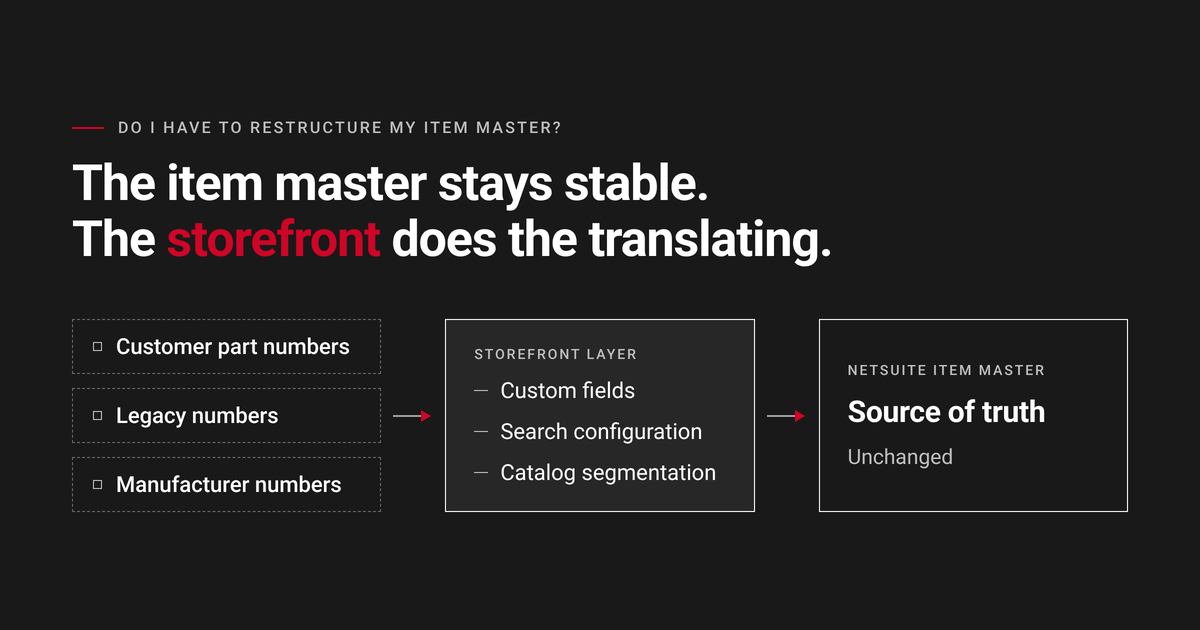
No. Our position is that the item master should stay stable and the storefront should do the translating. Restructuring an item master to solve a search problem is a months-long ERP project with operational risk. A storefront-layer solution is cheaper and does not touch the warehouse, purchasing, or finance.

The pieces look like this:

  • Custom fields on the item record that hold alternate identifiers (customer part numbers, legacy numbers, manufacturer numbers).
  • Exposing those fields to the website. Oracle documents field sets as the way to expose selected item record fields to a website, and notes that a field set reference lists which fields can be used for keyword search and faceting. Verify the exact search behavior for your account and release in the Oracle NetSuite documentation on defining field sets. The same page warns that field sets are public on the internet, so choose which fields you expose carefully.
  • Catalog segmentation so each customer group sees the right items and prices. Our write-up on Personalized Catalog Views covers how visibility can be controlled by customer segment.

NetSuite remains the system of record. Nothing about this design asks your operations team to change how items are created or maintained. The design work is in how search treats each identifier, and that is where an experienced SuiteCommerce implementation team earns its keep.

How should a storefront treat cross-references versus true item substitutes?

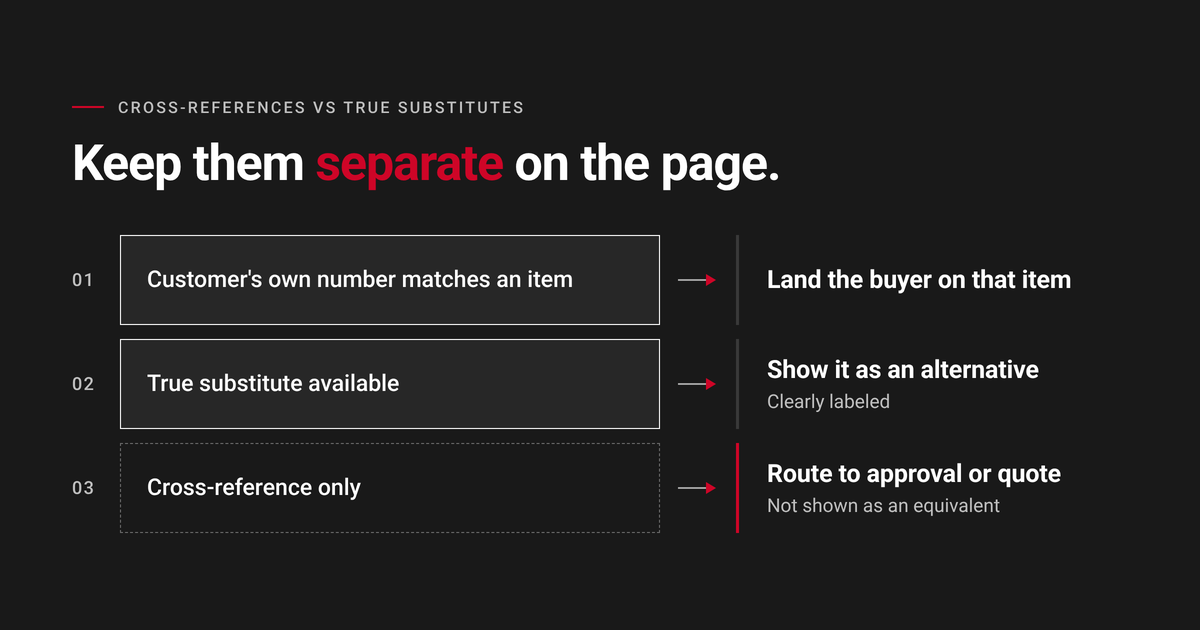
Keep them separate. A true substitute is the same part and can be offered freely. A cross-reference is a similar part that typically needs the customer’s permission before substitution. Merging the two on the page creates wrong shipments, returns, and in some industries compliance exposure.

Distributors often keep both concepts in different places: a cross-reference table on one side, and NetSuite’s item substitute field for genuine substitutes on the other. The storefront should respect that split.

Our recommended treatment (a design suggestion, to be validated per catalog):

  1. Customer’s own number matches an item: land the buyer directly on that item.
  2. True substitute available: show it as an alternative, clearly labeled.
  3. Cross-reference only: do not present it as an equivalent. Route it to a request-for-approval or quote flow so the commercial rule is honored.

How do you show availability that is not simply in stock or out of stock?

Treat availability as several states, each with its own storefront behavior: in stock, on order, made to order with a lead time, call for a quote, and visible only to logged-in established customers. A state shown wrongly is either a lost sale or a promise you cannot keep.

Large technical catalogs often have many items in the item master and a much smaller set in stock at any time. Hiding everything not in stock loses sales. Showing everything as orderable creates broken promises. The middle ground is deliberate states.

Two practical building blocks:

  • Visibility rules by customer segment (see the Personalized Catalog Views article above), including hiding items from logged-out visitors.
  • Grouping related standalone items on one product page. UnlockCommerce built the Fake Matrix Items (Siblings) extension for this. It is our own development, not a native NetSuite feature, and it lets separate items behave like a parent-child matrix on the storefront without converting them to true NetSuite matrix items.

SuiteCommerce part number search: UnlockCommerce approach vs restructuring the item master

FactorStorefront-layer approach (UnlockCommerce)Restructure the item master
Where the change happensCustom fields, search configuration, catalog segmentation, front-end renderingCore NetSuite item records and related processes
Operational riskLow, operations keep working as they do todayHigher, touches purchasing, inventory, and finance workflows
EffortScoped to the storefront and its configurationAn ERP project, typically months
Source of truthNetSuite, unchangedNetSuite, reshaped
Best fitMany customer-facing identifiers, one stable internal itemAn item master that is genuinely wrong for the business
Trade-offSearch design needs care and ongoing tuningHigher cost and longer timeline

Restructuring is not always wrong. If the item master itself is broken, fix it. If the master is sound and buyers simply search differently, solve it where the buyer is.

What does a catalog and search review involve?

A review looks at how your customers search today, what the site returns, and what can be fixed without touching the item master. It ends with a prioritized list, not a replatform proposal.

We start with real search terms and the zero-result and low-result queries. Then we map each to a cause: missing alternate ID, cross-reference confusion, visibility rule, or availability state. UnlockCommerce has delivered 350+ eCommerce projects and holds Oracle NetSuite Alliance Partner status, so we have seen most of these causes before. If your team wants an outside look, reach out to UnlockCommerce and ask for a catalog and search review.

FAQ

It can when that number is stored on the item (for example in a custom field) and exposed and configured for search. Exact behavior depends on your account and release, so verify against official NetSuite documentation before relying on it.

An item substitute is the same part and can be offered as-is. A cross-reference is a similar part that usually needs the customer’s approval before substitution. They follow different commercial rules and should look different on the storefront.

The goal is that it does not. The item master stays as is. Changes live in custom fields, search configuration, catalog segmentation, and the storefront.

Yes, catalog visibility by customer segment is supported through Personalized Catalog Views. Confirm the specific visibility options for your configuration in official documentation.

Picture of Santiago Juan

Santiago Juan

Santiago brings 15+ years of extensive experience in digital marketing and eCommerce. With his background in working with a SuiteCommerce agency, a growth agency, and an affiliate marketing agency, Santiago possesses a diverse skill set and a deep understanding of the industry. His proficiency in psychology allows him to establish strong connections with clients.

Share this post

You may also like