


SuiteScript 1.0 End of Life: How to Plan Your Move to SuiteScript 2.1

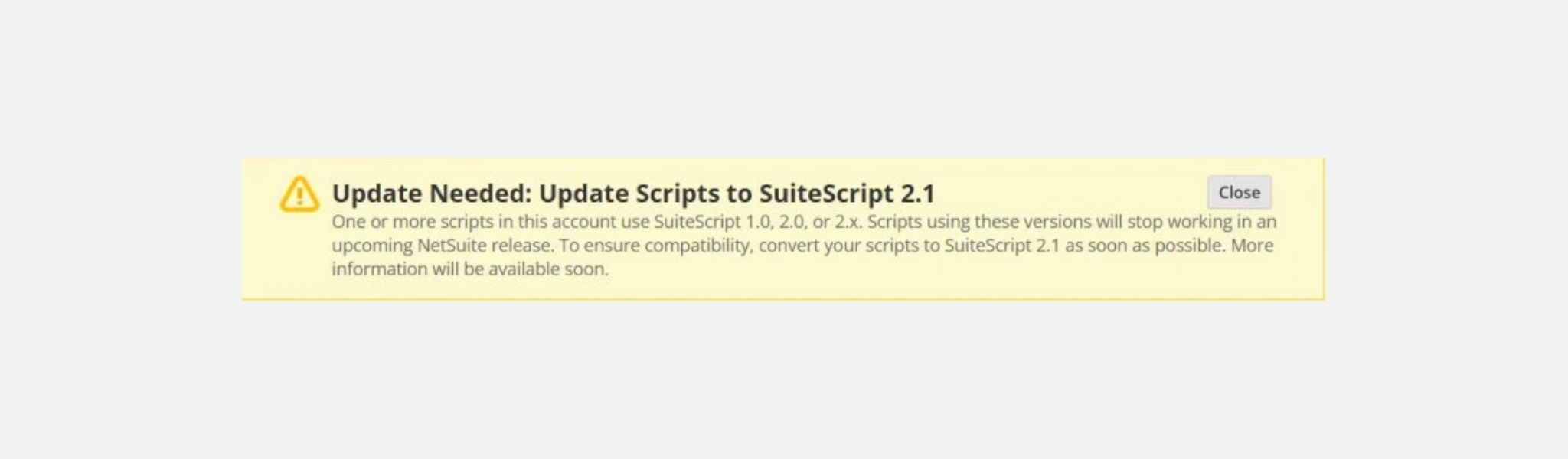
Your NetSuite admin logs in, sees a message asking to update scripts to SuiteScript 2.1, and forwards it to whoever handles development. Then the questions start. Which scripts? How many? What happens if we wait?

Converting the code is the easy part.

SuiteScript 1.0 end of life starts with NetSuite release 2027.1, when support for 1.0 covers critical issues only. By release 2028.2, every script in your account must use SuiteScript 2.1. That leaves time, and the best use of it is understanding what your scripts do before anyone touches the code. We are already working through this with a client, and this guide covers what we have seen so far. If you would rather have us map your account, that is what our SuiteScript 2.1 Migration Assessment does.

Table of Contents

1. The "update your scripts" message in NetSuite

If you saw it, nothing is broken today. The message points to scripts in your account that are not on SuiteScript 2.1 yet. NetSuite is standardizing on 2.1, and those customizations need to move before the deadline.

2. When is SuiteScript 1.0 end of life?

NetSuite is phasing out SuiteScript 1.0, 2.0 and 2.x over four releases. Support for 1.0 narrows to critical issues in release 2027.1, and from release 2028.2 only SuiteScript 2.1 runs.

 
NetSuite release What changes What it means for your account
2026.2 (current) SuiteScript 2.1 becomes the standard for new and existing scripts. New customizations should be written in 2.1.
2027.1 (early 2027) SuiteScript 1.0 moves to end-of-life support, covering critical issues only. For other issues, NetSuite asks you to convert the script to 2.1 first.
2028.1 (early 2028) SuiteScript 1.0 can no longer be deployed in new accounts. SuiteScript 2.0 and 2.x scripts run as 2.1 by default. Your 2.0 scripts start running on the 2.1 engine, so plan their testing before this release.
2028.2 (later in 2028) All new and existing scripts must use SuiteScript 2.1. Legacy versions no longer run. Any 1.0 or 2.0 script left in your account stops working.

3. SuiteScript 1.0 vs 2.0 vs 2.1

SuiteScript 1.0 calls NetSuite through global nlapi functions. SuiteScript 2.0 moved to modular APIs, loaded as N/ modules. SuiteScript 2.1 keeps the same modules and structure as 2.0 and runs on a newer JavaScript engine.

 
SuiteScript 1.0 SuiteScript 2.0 / 2.x SuiteScript 2.1
How it calls NetSuite Global nlapi and nlobj functions Modular N/ modules (N/record, N/search) Same N/ modules as 2.0
Script structure Functions named on the script record define() wrapper with entry points Same as 2.0
JavaScript version Older syntax ES5.1 Modern syntax (let, const, arrow functions, template literals)
Sublist line numbering Starts at 1 Starts at 0 Starts at 0
Typical migration work Logic rebuilt, near-full rewrite Version update plus compatibility fixes None

The jump from 2.0 to 2.1 is small. The jump from 1.0 is not. Some 1.0 functions have no direct 2.1 equivalent at all, and NetSuite lists them in its SuiteScript 2.1 transition guide.

4. Why changing the version isn't enough

A script can move to 2.1, deploy without errors and still do something different with your records. No error is not the same as the same result.

With 1.0, it’s rarely a matter of renaming functions. The structure of the solution inside the script changes, so the work is closer to a refactor. With 2.0, most scripts keep working on the 2.1 engine, but every one of them needs testing. NetSuite lets you test server scripts in the 2.1 runtime through a company preference before you update the version annotation. Client scripts are not covered by that preference, so you update the annotation and test them directly.

5. Where to look first

Start with the scripts your operations depend on: User Event scripts that validate sales orders, customers and items when they are saved, client scripts behind the forms your team uses every day, scheduled scripts that run nightly syncs, Suitelets and RESTlets that connect NetSuite with your eCommerce site or 3PL, and Workflow Action scripts inside your approvals.

Bundles and SuiteApps from other vendors are a separate conversation. Their vendors maintain them, and some of their objects are locked, so you can review them but not edit them. List them and ask each vendor about their upgrade plan.

Then look for scripts nobody uses anymore. Most accounts have inactive, duplicated or half-finished scripts that can be retired instead of migrated. Check before you retire anything, though. Some scripts only run at month-end or once a season.

Since you are opening every script anyway, review the whole account while you are there. In one of the accounts we are assessing, the review turned up a Suitelet deployed as available without login. That’s a high-severity security finding, and it has nothing to do with the version change. Outdated customizations and scripts that could run more efficiently show up the same way.

6. How we plan a SuiteScript 2.1 migration

We work in four steps:

  1. Inventory and classify: every script record and deployment, with bundles and SuiteApps separated from custom code, and each custom script classified by version, type, status and risk.
  2. Analyze the code: the APIs each script uses and their 2.1 equivalents, noting where the logic itself needs to be rebuilt.
  3. Map dependencies and impact: which scripts, workflows and records depend on each script, and what else a change could affect.
  4. Estimate and plan in waves: effort script by script, grouped into phases with a clear reason behind each one, such as scripts that share dependencies or run on the same record event.

That plan is what our assessment delivers, in a report your team can approve one wave at a time.

How long does the migration take? It depends on how many scripts you have, their version and how connected they are to the rest of the account. Rewriting code is now the fast part. Testing takes longer, and 1.0 scripts take the most time because they are mostly rewritten.

We use AI tools for this, including NetSuite’s SuiteScript upgrade skill. It maps 1.0 calls to 2.1 modules and speeds up the conversion. On its own, it does not tell you what else depends on a script, or whether the result still fits the process behind it. A developer still reviews every change.

Can your own team do it? If they wrote the scripts and have sandbox time, yes. A partner makes more sense when scripts are undocumented, came from past vendors or tie into commerce and integrations. Plenty of teams split the work.

7. Where to start

You don’t need to migrate everything this quarter. You do need to know what’s in your account. Start with an inventory, understand what each script does for the business, and plan the work in phases that fit your operations.

If you want us to map it for you, plan your SuiteScript 2.1 migration with our NetSuite team. Let’s talk about your account.

SuiteScript 1.0 end of life FAQ

Each script record shows its SuiteScript API version, and NetSuite’s Help Center explains how to list scripts that are not on 2.1. A list tells you which scripts to look at, but not what each one does, what depends on it or how urgent it is.

Yes. NetSuite is phasing out SuiteScript 1.0, 2.0 and 2.x over several releases. Support for 1.0 covers critical issues only from release 2027.1, and from release 2028.2 every script must use SuiteScript 2.1.

It stops running. Any process that depends on it, such as an order validation, an approval or an integration sync, stops with it until the script is converted.

No. Inactive, duplicated or half-finished scripts can be retired instead. Confirm what each one did first, since some only run at specific times of the year.

Picture of Fabian Rodriguez

Fabian Rodriguez

Tech Lead with a strong background in software engineering and extensive experience developing customized NetSuite solutions. He brings a wealth of technical expertise to the team and is dedicated to delivering high-quality, efficient, and scalable solutions for our clients' eCommerce needs. With a keen focus on maintainability and long-term performance, Fabian plays a key role in designing and implementing customizations that help clients improve their processes and achieve their goals.

Share this post

You may also like