

SuiteCommerce Content Migration: How to Move Your Site Without Losing SEO or Burning Your Budget

When you replatform onto SuiteCommerce, your product catalog moves cleanly. The rest of your site doesn’t move on its own, and that’s where SuiteCommerce content migration usually turns into an unplanned scramble. The blog, the case studies, the landing pages that took years to build and rank in search: those get copied by hand at billable hourly rates, left behind and dropped from search results, or stranded on an old CMS you keep paying for next to your new store.

None of those are good outcomes, and most companies discover the gap late, after the launch date is already fixed and the budget is already set.

Table of Contents

Why Content Migration Gets Treated as an Afterthought

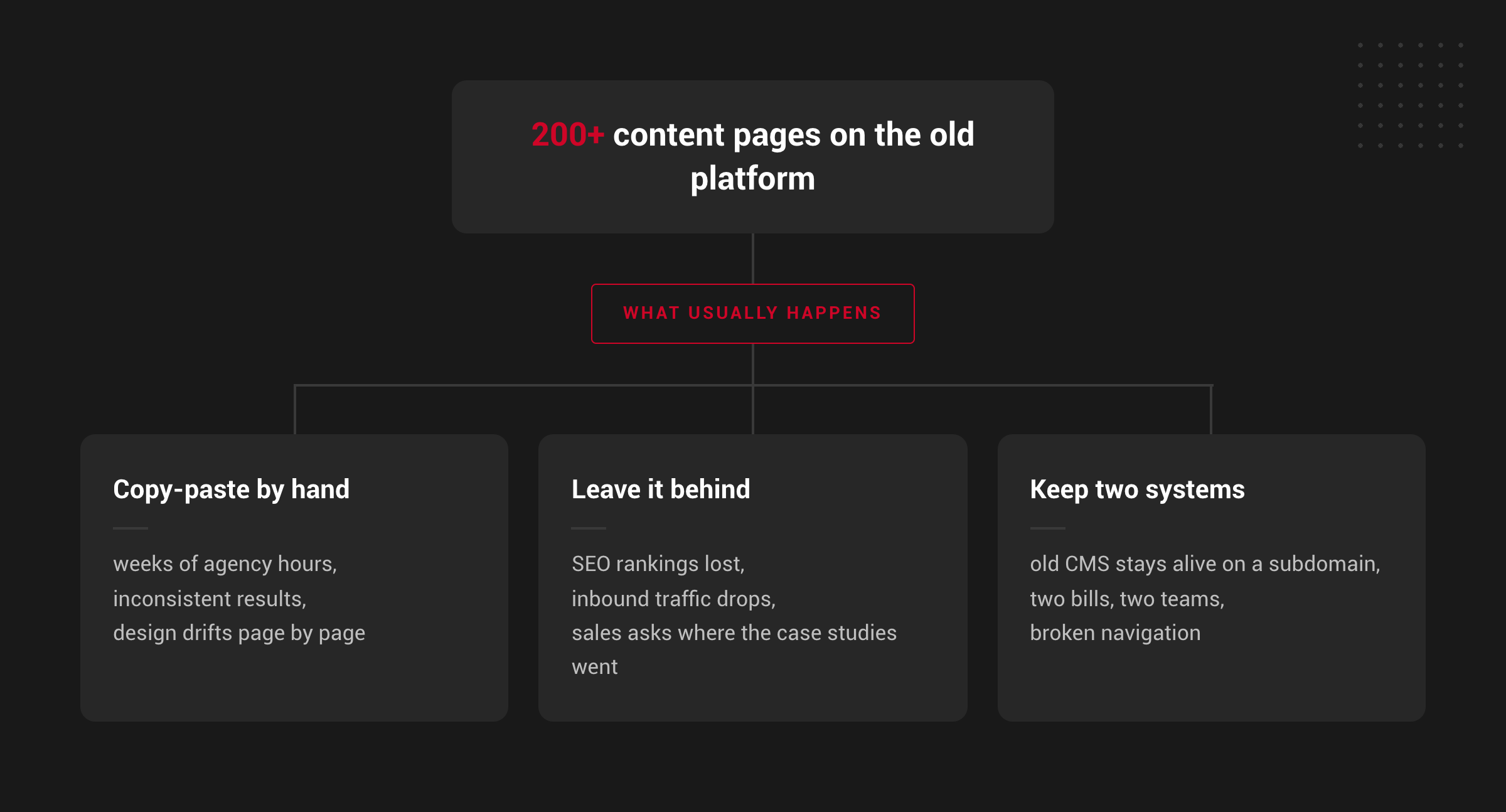
A SuiteCommerce replatform is scoped around the store: the catalog, checkout, pricing, and customer accounts. Content rarely gets its own line item, because it’s assumed to be simple. Then someone counts the pages. A site with five years of blog posts, a resource library, and a webinar archive can easily have 200 or more indexed URLs that have nothing to do with the product catalog and everything to do with organic traffic.

Once that count is on the table, most companies land on three options, and each one carries a real cost.

a) Copying Content by Hand

A developer or content editor moves each page manually: text, images, formatting. At a rate of one or more billable hours per page, a 200-page site turns into weeks of agency time, and the design tends to drift page by page as different people do the work.

b) Leaving Older Content Behind

Pages get quietly dropped instead of migrated. The pages that were still ranking, still bringing in inbound traffic, and still answering prospect questions disappear along with the old platform.

c) Running Two Systems Side by Side

The old CMS stays alive on a subdomain so nothing gets lost. Now there are two platforms, two bills, two teams, and a navigation experience that never quite matches.

How SuiteCommerce Content Migration Works

SuiteCommerce, NetSuite’s native commerce platform, includes Site Management Tools: the visual editor a content team uses to manage pages without a developer. An automated content migration process is built to get your existing content into that same native environment, not into a separate system bolted onto it.

The process works from your site’s sitemap to identify every page and blog post in scope, then moves through each one: pulling the text along with its layout and styling, downloading the images, and preserving the blog metadata (authors, categories, publish dates) inside SuiteCommerce. Because styling travels with the content, pages look the way they did on the old site instead of drifting toward whatever the person copying them chose that day.

Because the content lands in the platform’s own CMS, your team keeps editing visually in Site Management Tools the same way they always have. No developer has to sit between your content team and a headline change.

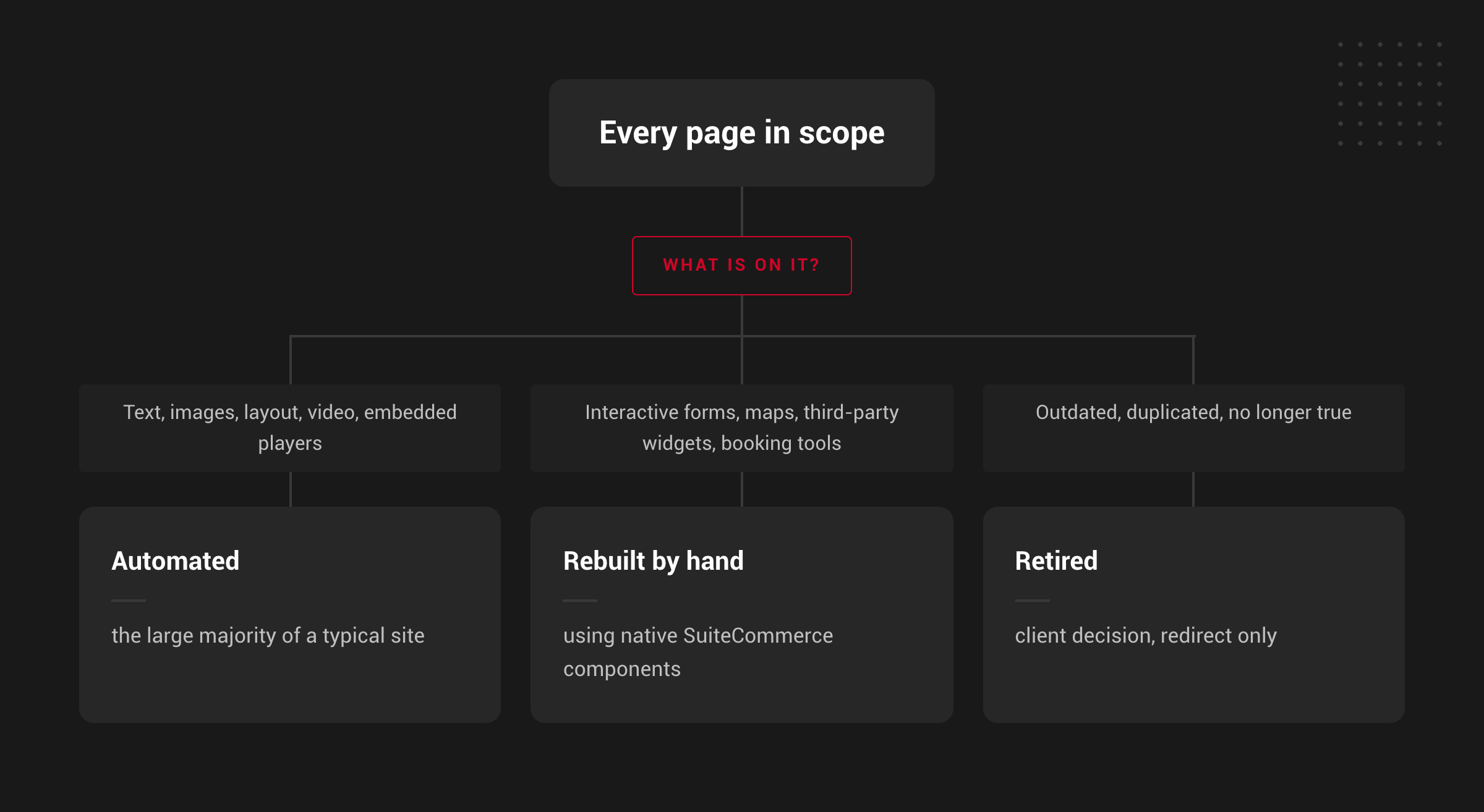
Automation covers the majority of a typical site: standard text, images, layout, and embedded video. It isn’t built to handle everything, and a partner who claims otherwise is setting up a rough final two weeks of the project. Interactive forms, maps, booking widgets, and other third-party tools get rebuilt by hand on native SuiteCommerce components so they actually submit into NetSuite. Pages that function more like an application than a landing page (a careers page with resume uploads, for example) get flagged for manual rebuild too. That mix of automated and manual work is what keeps a migration fast and accurate, instead of fast and sloppy.

We’ve recently used this exact process on a live SuiteCommerce replatform: a multi-year blog archive and a full set of resource pages moved into the native CMS, images rehosted in the client’s own NetSuite account.

What Happens to Your Search Rankings During a Content Migration?

Wherever SuiteCommerce’s URL structure allows it, the process recreates each page under its original address. That means the pages ranking today keep the same URL after the move, so there’s nothing to redirect for most of the site. It also means the links between your own posts and pages keep working as they are. Years of internal linking, which is part of what got those pages ranking, carry over without anyone touching a single anchor.

Where SuiteCommerce constrains how a URL can be shaped, a complete old-URL-to-new-URL redirect map covers the exceptions, along with page titles and meta descriptions, so search engines and inbound links resolve correctly. Google’s guidance on site moves with URL changes is the reference to hand your SEO agency.

As a NetSuite Alliance Partner and Oracle NetSuite SDN Partner, and the team behind the original SuiteCommerce platform, we approach this the same way we approach the rest of a replatform: process first, promises second. More on the platform itself in NetSuite’s SuiteCommerce overview.

Getting the Timing and Scope Right

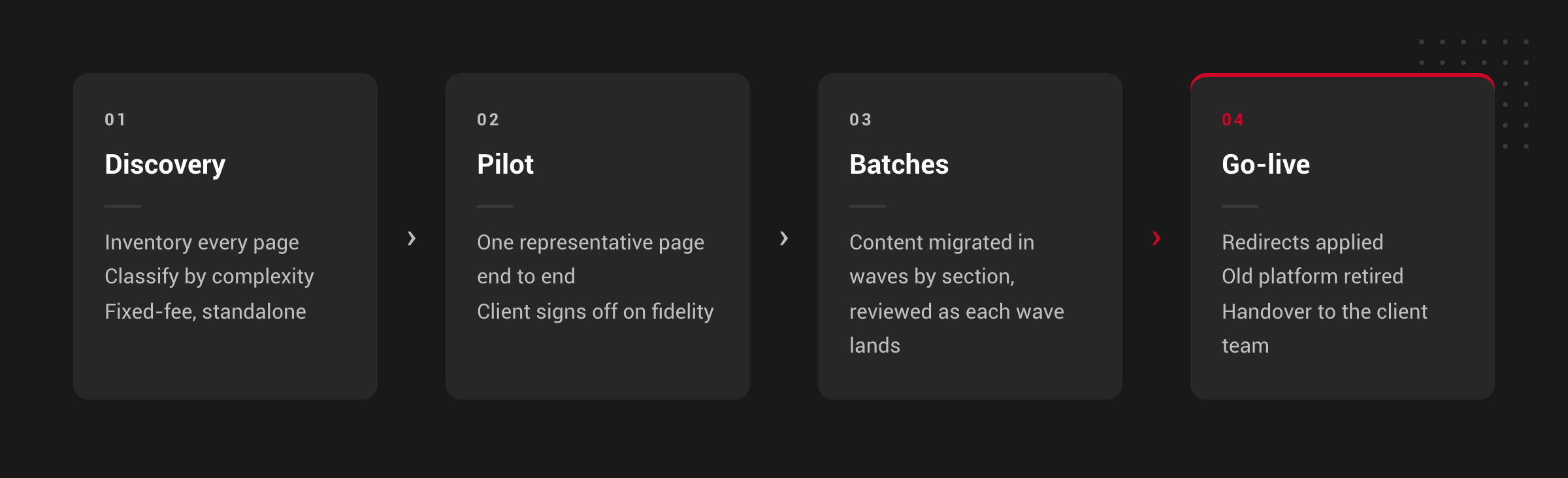
A structured migration runs in four stages, and each one exists for a reason beyond process for its own sake (discovery, pilot, batches, go-live).

Why discovery comes first

Page count alone doesn’t determine what a migration takes. A hundred straightforward landing pages move faster than thirty pages loaded with forms, embedded maps, and video. Discovery inventories every page and classifies it by complexity before any migration work starts, so the scope reflects what’s actually on the site, not just how many pages it has. That inventory has value on its own, even for a team that decides to handle the rest in house.

Why a pilot comes before volume work

Whether a migrated page “looks right” is subjective until someone signs off on it. Migrating one representative page end to end and getting the client’s content owner to review it turns an open-ended argument about visual fidelity into an agreed standard before the rest of the site moves in batches.

What still needs a human, not just the script

Automation handles the majority of a typical site: standard text, images, layout, and embedded video. A handful of page types always get scoped as manual work instead:

  • Forms. Contact forms, quote requests, and newsletter signups get rebuilt on native SuiteCommerce components so they submit into NetSuite, not into the platform being retired.
  • Maps and location finders.
  • Third-party embeds beyond standard video, like booking widgets, chat, and calculators.
  • Video hosting, which behaves differently from images inside NetSuite and usually needs its own decision.
  • URL structure edge cases, where SuiteCommerce can’t reproduce an old URL exactly. This is exactly what the redirect map is built to cover.
  • Editorial cleanup, deciding what’s actually worth keeping, which is always the client’s call, not the migration team’s.

Buyers should be able to name their forms, maps, and embedded tools during discovery. If a partner can’t tell you which of your pages fall into that bucket before migration starts, that’s a scope gap waiting to surface late.

SuiteCommerce Content Migration FAQ

Not if URLs, titles, and meta descriptions carry over and a redirect map covers anything SuiteCommerce’s structure requires to change. No partner can honestly promise ranking outcomes, but the technical foundation for keeping your rankings intact is a deliverable, not a hope.

You can, but it means two platforms, two bills, and content living outside the system your team uses for the store. It postpones the migration rather than avoiding it.

Your own content team, directly in SuiteCommerce’s Site Management Tools. There’s no separate CMS or proprietary layer to depend on once handover is complete.

The process reads your site’s sitemap to identify pages and posts, which is how most WordPress to SuiteCommerce content migration projects start. Every source platform, whether WordPress, WooCommerce, or something else, has its own quirks worth reviewing during discovery.

What to Do Next

If you’re planning a SuiteCommerce replatform and haven’t scoped what happens to your existing content, start with a page inventory: how many pages you have outside the product catalog, how many include a form or an embedded tool, and whether your organic traffic depends on any of them. If you’re evaluating a SuiteCommerce agency for the project, ask directly how they handle that content. It’s a good filter for whether they’re thinking about your whole site or just the store.

Picture of Fabian Rodriguez

Fabian Rodriguez

Tech Lead with a strong background in software engineering and extensive experience developing customized NetSuite solutions. He brings a wealth of technical expertise to the team and is dedicated to delivering high-quality, efficient, and scalable solutions for our clients' eCommerce needs. With a keen focus on maintainability and long-term performance, Fabian plays a key role in designing and implementing customizations that help clients improve their processes and achieve their goals.

Planning a SuiteCommerce content migration?

We're here to help!

Share this post

You may also like