
Is Your Theme Ready for the SuiteCommerce 2026.1 Upgrade?
SuiteCommerce 2026.1 delivers real performance gains, but heavily customized themes are at risk of breaking on upgrade. Here is what changes and how to upgrade without downtime.
A fallback theme in SuiteCommerce/SuiteCommerce Advanced (SCA) is a lightweight custom theme that overrides only the files you change; everything else “falls back” to the base theme. It allows you to customize only the necessary files — like templates, styles, or assets — while the rest is handled by the base theme.
Introduced in release 2023.2, this architecture slashes maintenance, speeds deployments, and keeps you compatible with NetSuite updates. Below you’ll find the requirements checklist, step-by-step setup, common pitfalls, and tips for keeping your storefront lean.
| Benefit | Why it matters |
|---|---|
| Less maintenance | You only patch files you changed, so future NetSuite upgrades are smoother. |
| Update independence | Allows you to update SuiteCommerce Base Theme to the latest version without any risk. |
| Quicker deployments | Smaller theme bundles upload and activate faster, which is noticeable on multi-domain sites. |
| Cleaner repos | Engineers can find real customizations at a glance rather than sifting through boilerplate. |
| Requirement | Minimum version |
|---|---|
| SuiteCommerce / SCA | 2023.2 |
| Theme Developer Tools | v23.2.x |
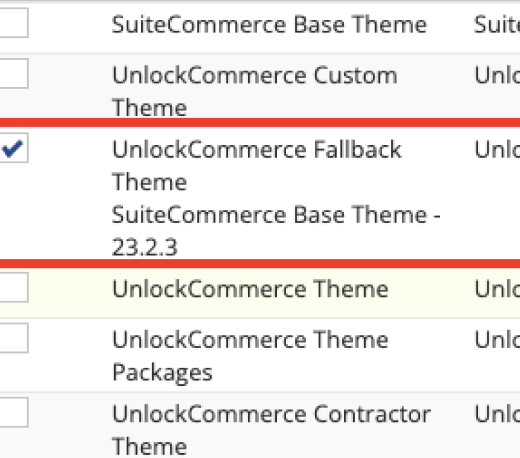
| SuiteCommerce Base Theme | v23.2.x or later installed and activated on the domain |
The version of dev tools cannot be higher than the version of the base theme installed and activated.
Confirm you’re on compatible versions before you start; mismatches will throw manifest.json validation errors.
Follow this quick-start, then scroll for the “why” behind each step.
| Step | Command or action | Purpose |
|---|---|---|
| 1. Install DevTools | npm install -g @oracle/suitecloud-theme-tools@23.2 | Make sure you’re using the latest compatible version. |
| 2. Install Dependencies | npm install | Install the project dependencies. |
| 3. Create the custom theme | Ensure "sub_type": "fallback" | This is very similar to creating an extension — the steps are almost identical. |
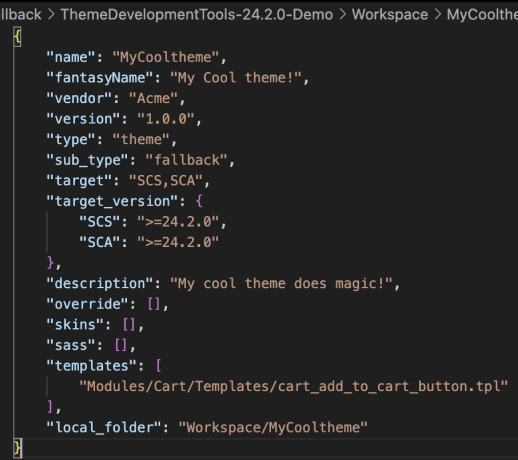
| 4. Check the manifest | Ensure "sub_type": "fallback" | After creating the custom theme, the manifest.json file includes a property called "sub_type" set to "fallback", indicating that the theme uses fallback functionality. |
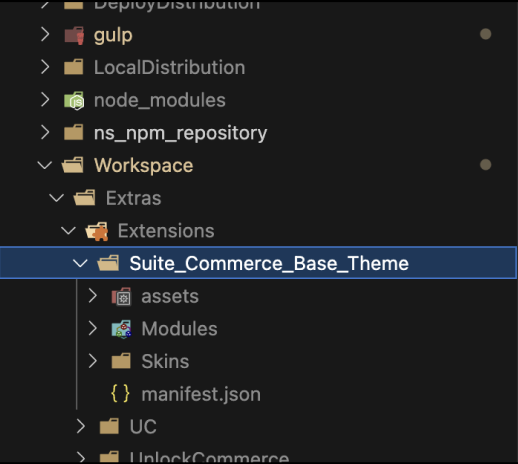
| 5. Run new theme locally | First run pulls down the base theme to /Extras. | On the first run, this will download the base theme to the extras folder, similar to an extension fetch of the theme. |
| 6. Start customizing | Copy-edit only the files you truly need. | After all these steps we can start with the customizations. |
Under the hood, DevTools stores the base theme in an Extras directory so you can diff against originals without leaving your IDE.
a) Mirror the path – If you plan to override /Templates/ProfileEdit.tpl, replicate that exact folder structure inside your theme.
b) Copy once, then tweak – After copying the same folder structure for the file you want to customize, copy the file itself and paste it into that folder.
Restart local server – If the project is running locally, press CTRL+C to stop the terminal, and then run it again so the new file can be reflected in the manifest.json
Once you’re live on a fallback theme, adopting the next SuiteCommerce release becomes a routine CLI upgrade rather than a week-long merge marathon. Your designers stay nimble, your engineers focus on value-add features, and your site benefits from Oracle’s ongoing accessibility, performance, and bug-fix updates—all with minimal overhead.
SuiteCommerce 2026.1 delivers real performance gains, but heavily customized themes are at risk of breaking on upgrade. Here is what changes and how to upgrade without downtime.
As of NetSuite 2026.1, a custom tool can ship a real interactive UI that renders inside your AI client, not just text. We built and validated a Saved Search Dashboard end to end in Claude.
An honest comparison from a partner-agnostic agency that builds on both platforms. When Shopify Plus wins, when SuiteCommerce wins, and the questions that should actually decide your B2B platform.